
Paperless Office in 2025: Trends, Benefits, and Challenges
Paperless Office

An HR document is often described as electronic even though its workflow has not changed. HR prepares a file in Word, prints it, collects signatures, scans it and uploads it back into the system. Several technical steps are added to the old process, while tracking down the latest version and checking its status remain manual.
In 2026, companies gained another reason to complete the transition: electronic document management rules were officially extended to employment relations.
On 1 May 2026, Order No. 4408 of the Ministry of Economy of Ukraine, dated 26 March 2026, entered into force, expanding the use of electronic document management in employment relations. Previously, the relevant Procedure governed electronic document management only within the occupational health and safety management system.
This is the Procedure approved by Order No. 839-21 of the Ministry of Economy of Ukraine, dated 28 October 2021. The order was developed by the State Labour Service of Ukraine.
The key wording in the revised version is as follows: the Procedure governs the use of electronic document management in employment relations, including occupational health and safety, and is mandatory for all employers that have decided to implement it.
Documents that may be used in digital format include employee requests; employer orders and directives; documents relating to leave, business trips, transfers and dismissals; occupational health and safety documents; and other employment-related documents required by law.
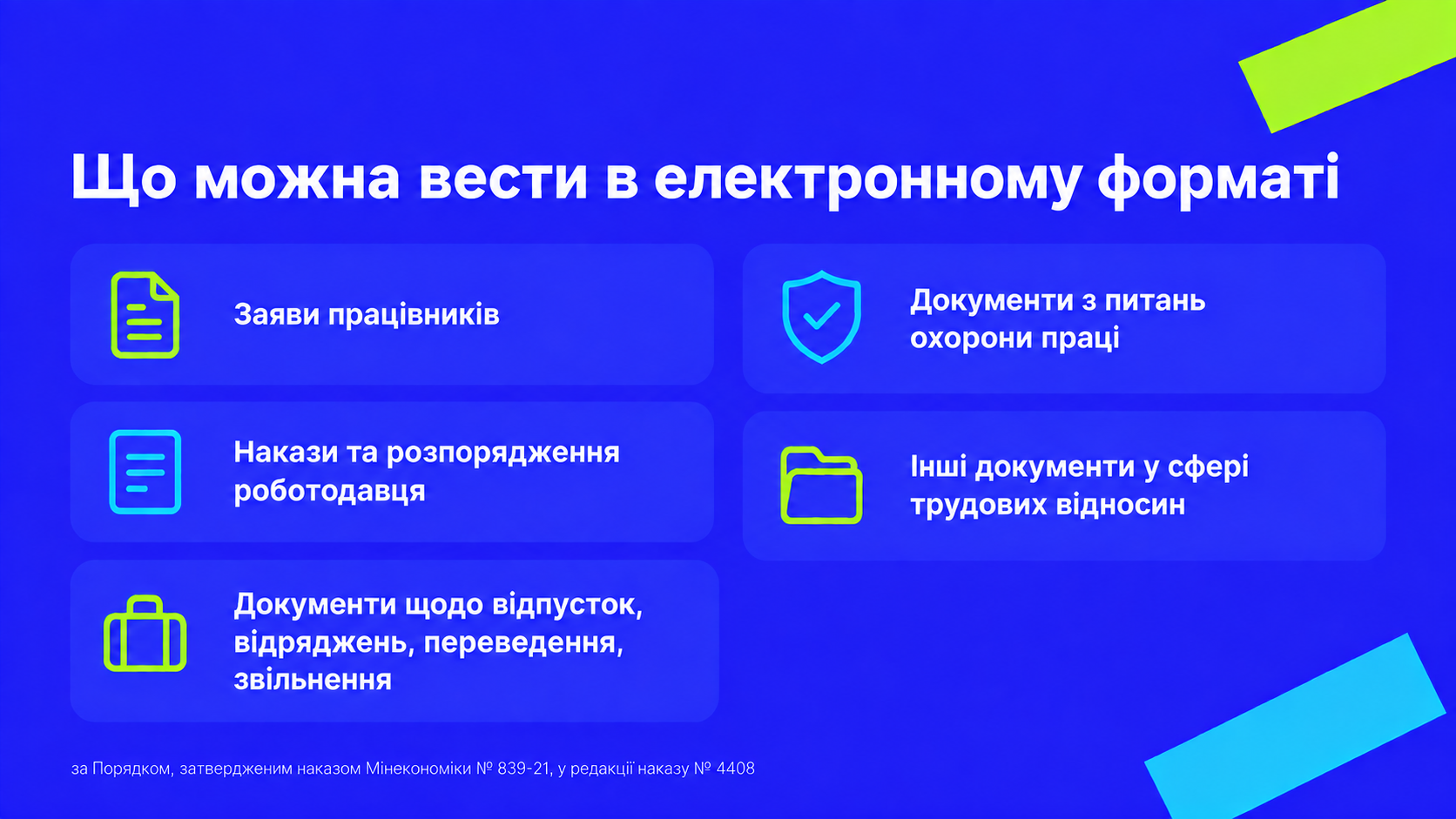
This is the detail that most overviews tend to overlook, yet it determines the entire course of action.
The transition to electronic document management is optional. The employer independently decides whether to implement it and formalises this decision through an appropriate order or directive. The provisions of the Procedure become mandatory for the employer only after such a decision has been made.
In other words, HR electronic document management begins not with choosing a system, but with an internal administrative document. First, the company formalises its decision and sets the rules. Only then does it configure the workflows in the app. If this is done in reverse, the process will operate without a regulatory foundation.
The legal framework for the documents and signatures themselves is established by the Law of Ukraine No. 851-IV of 22 May 2003 “On Electronic Documents and Electronic Document Management” and the Law of Ukraine No. 2155-VIII of 5 October 2017 “On Electronic Identification and Electronic Trust Services”.
The list of documents, types of signatures, retention periods and company-specific exceptions are determined by the company’s legal team. There is no universal approach that applies to every HR document.
Sending a PDF by email is easier than carrying a folder from one office to another. But someone still has to identify the approvers, verify the latest version, remind people to sign it, record the date and transfer the data to the HR system.
HR electronic document management begins when these actions are performed by the system rather than a person. Each document has an author, status, version, approval history and designated storage location.
That is why unnecessary steps should be removed before automation begins. If a company transfers its existing approval process into a digital format without reviewing the underlying logic, it ends up with the same complex process on a new screen. We take a closer look at how this works using leave requests as an example in the article “You Have Already Moved Leave Requests Online. Why Hasn’t the Process Become Any Faster?”
The initial set should be selected based on request volume, how repetitive the workflow is and the number of manual handovers involved. It typically includes:
There is no need to launch everything at once. One well-configured workflow will reveal where data is missing, who is holding up approvals and which exceptions HR still handles manually.
A process with frequent requests and clearly defined roles is a good choice for a pilot. Leave requests usually meet these criteria, but the final decision should be based on the company’s own data.
Problems with HR electronic document management rarely start with a button or a form. They usually arise because the team has not agreed on the rules the system is expected to follow.
These decisions require collaboration between HR, Legal, IT, Information Security and Records Management. Technical configuration alone will not resolve them.
An employee request, a manager’s approval, acknowledgement of an order and the signing of a document have different legal implications, so each requires a different form of verification. The company defines the appropriate method separately for each document type in its internal policies.
DEEP supports qualified electronic signatures for both individuals and legal entities, including through Diia.Signature. Under the Law of Ukraine No. 2155 “On Electronic Identification and Electronic Trust Services”, a qualified electronic signature has the same legal effect as a handwritten signature or seal.
One practical consideration for companies with a large proportion of operational staff is that not every employee has a digital signature. In addition to Diia.Signature, employees can obtain a qualified electronic signature from any qualified electronic trust service provider, including banks that offer this service to individuals. The specific terms should be confirmed with the bank the company already works with.
The company’s HR system should remain the source of employee data. If the electronic HR document management system creates its own employee directory that HR must update manually, you have added work rather than eliminated it.
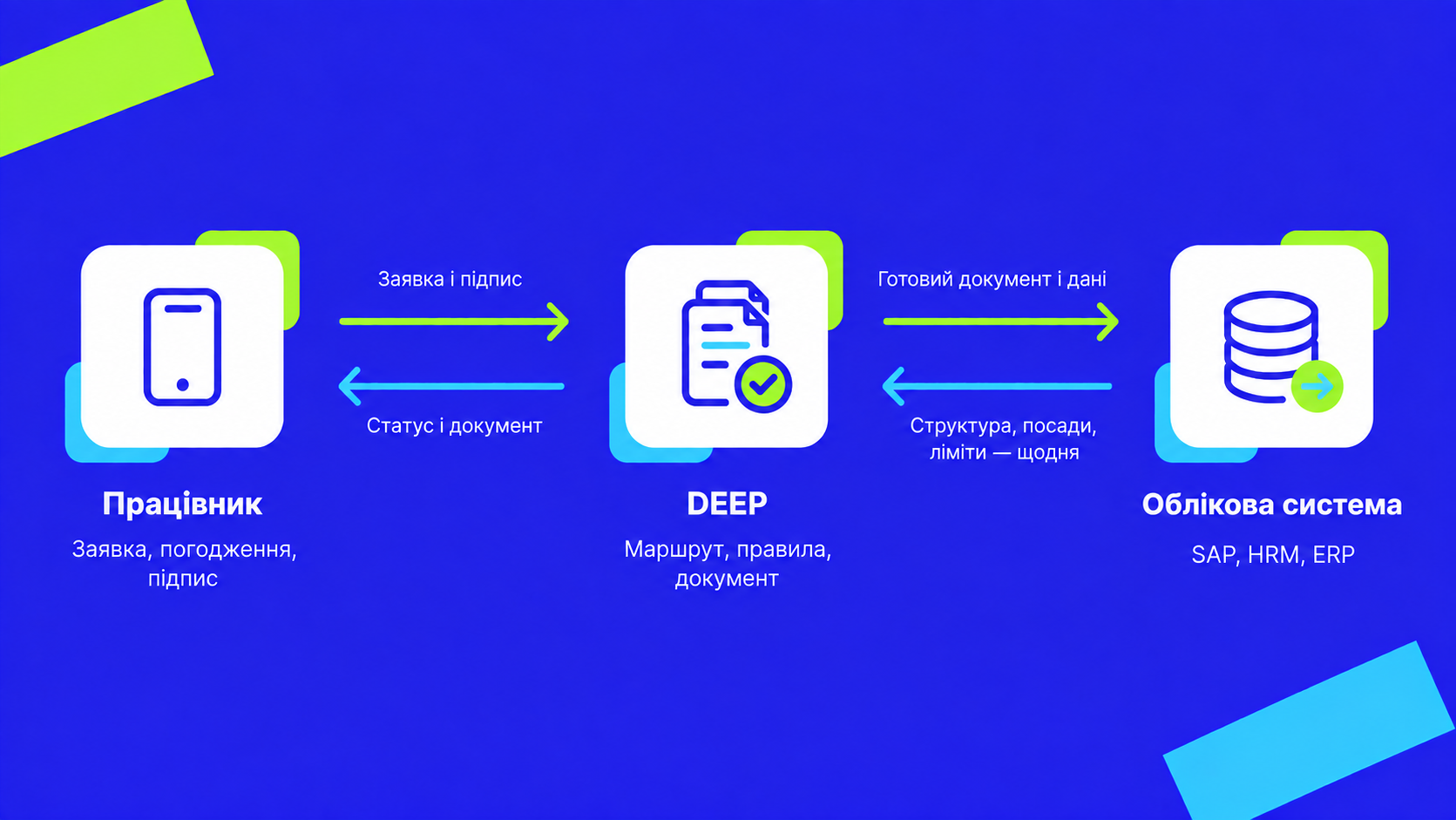
In DEEP, the organisational structure, employee records, positions, limits and access data are updated automatically from the HR system every day. Requests and documents are transferred back via API. The level of automation depends on how the integration is configured on the HR system side.
A new employee gains access once their record appears in the HR system, while an employee who leaves the company loses access when the data is updated. The solution does not replace the system of record: DEEP integrates with existing corporate systems, including SAP, HRM and ERP. The average time required to integrate and connect the services is around three weeks.
100% workforce coverage, including operational staff without a digital workplace. Around 25,000 active users in the mobile app every month. A total of 44,000 leave requests are processed entirely digitally every quarter, with no paper documents. Some 2,500 digital certificates are issued every month without employees having to visit the HR department.
For another company, the configuration will be different, with its own documents, workflows, roles and integrations. The platform provides the foundation, while the implementation team configures it around the company’s actual processes.
A presentation of features will tell you little about whether the system is ready for your processes. Ask the team to take one document through the entire workflow and demonstrate seven things:
The answers will show whether the system truly supports your end-to-end workflow or simply adds a new interface to the same old manual tasks.
Is the transition to electronic HR document management mandatory?
No. It is an optional alternative: the employer decides whether to make the transition and formalises this decision through an order or directive.
Where should a company start?
With an internal administrative document formalising the transition and approved rules covering the list of documents, workflows, signature types, acknowledgement procedures and document retention. System configuration comes after that.
Which documents can be managed digitally?
Employee requests; employer orders and directives; documents relating to leave, business trips, transfers and termination of employment; occupational health and safety documents; and other employment-related documents required by law.
Do we need to replace our system of record?
No. DEEP works on top of the existing system and exchanges data with it via API.
Which type of signature should be used?
A qualified electronic signature, including through Diia.Signature. The company defines the specific signing methods for each document type in its internal policies.
How long does implementation take?
The average integration time with existing systems is around three weeks.
During the demonstration, the MODUS X team will take a document through the complete workflow using your example, from the employee’s request to approval, signing and transfer of the final result to the system of record. It is best to start with the process that currently creates the most manual work.