
You’ve already moved leave requests online. Why hasn’t the process become any faster?
Paperless Office

In January 2026, the Supreme Court considered a dispute in which a former employee of a large state-owned company argued that he had not been notified of the suspension of his employment contract. The employer presented a Viber conversation to the court, and the court accepted the message as valid evidence, provided that the recipient, content and date could be established.
One detail played a significant role: the employee had replied to the message sent in April 2022 with, “Hi. OK.”
Now consider this from the perspective of a company with 2,000 production workers. Proof of acknowledgement existed because the employee happened to be polite enough to reply.
A messenger works until something needs to be proven. And the problem is not the messenger itself. For an employee without corporate email, there is often no other communication channel within the company, so HR documents continue to circulate through personal chats and informal arrangements for years.
This is most evident in the case of a payslip.
Article 110 of the Labour Code of Ukraine requires employers to inform employees, each time their salary is paid, of the total amount with a breakdown by type of payment, the amounts and grounds for deductions, and the net amount payable. The provision does not prescribe a specific form of notification, as the State Labour Service also notes in its guidance.
This is why professional publications and labour law advisers consider electronic notification permissible. However, the decision rests with the company’s legal team, and the procedure for providing such information must be established in an internal policy.
The same applies to employee requests, certificates and acknowledgement of orders. Corporate email is not prescribed anywhere as a condition for accessing HR services. It simply proved convenient for the people designing these systems because they used it themselves.
Concerns about the digital skills of operational staff come up in almost every other discussion. Yet it almost always turns out that people are not the problem. The real barrier is the sign-in process.
Employees without a work account are asked to register: create a username, come up with a password, verify an email address they do not have, and find the name of their business unit in a directory. Most users drop out at this stage, and the company concludes that they lack digital skills.
Registration does not need to be a separate step at all. The company already has all the necessary employee data: name, position, business unit, leave balances and phone number. It is already stored in the company’s system of record.
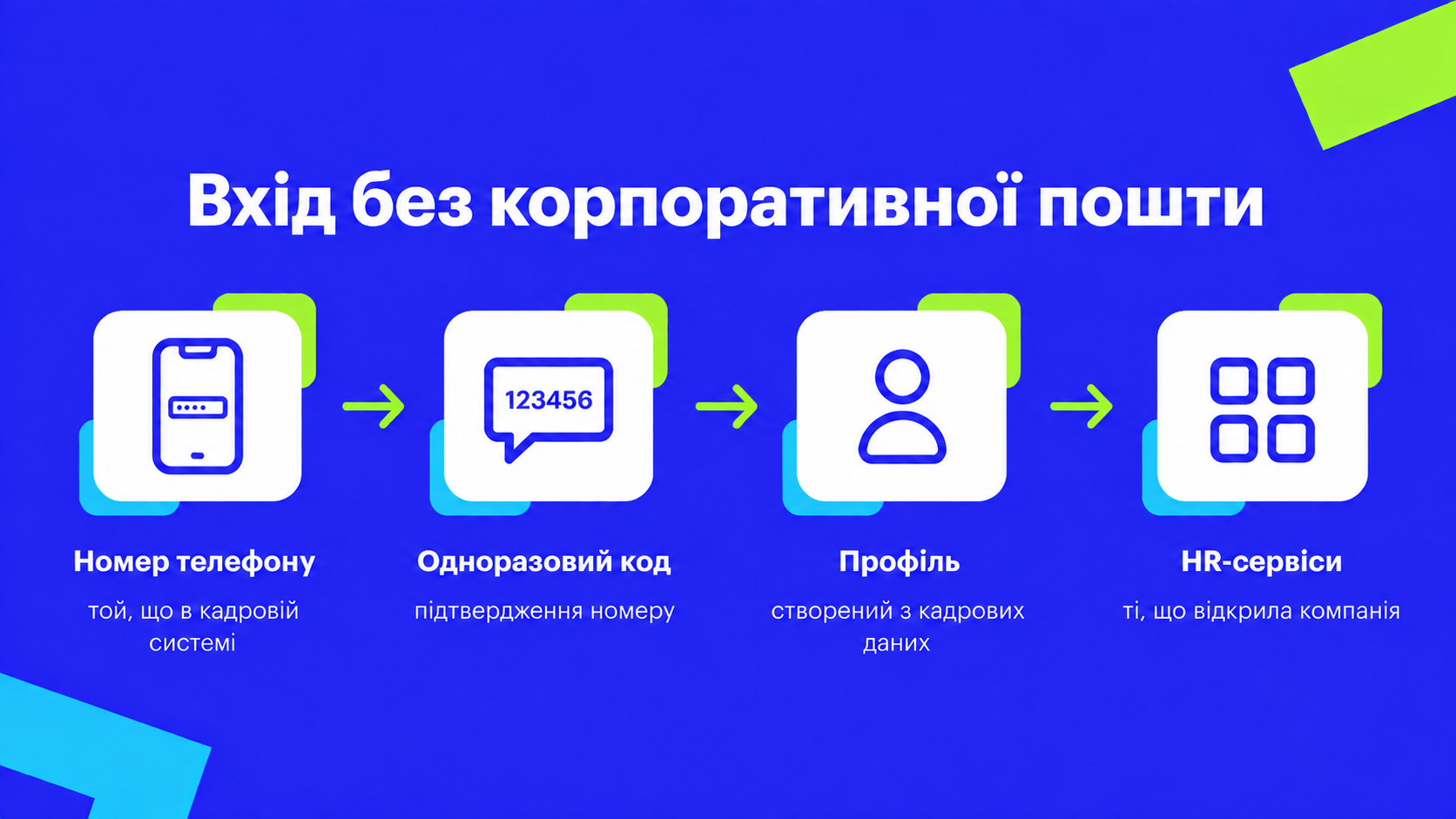
In DEEP, each employee profile is created using the company’s HR data. The employee downloads the app using a link provided by HR, enters their phone number, the same number stored in the HR system, confirms it with a one-time code and is taken to their profile, where they can access the services available to them.
They do not need to create a password, enter the company name or search for their approver. Corporate email, a VPN and additional software on the smartphone are not required.
The data is updated daily. A new employee gains access once their record appears in the system of record, while an employee who leaves the company loses access when the HR data is updated, with no separate IT request required.
It is worth being transparent about sign-in using a one-time code because the information security team will raise this question, and it is better to address it before they do.
Under the NIST Digital Identity Guidelines, which are not a Ukrainian legal standard but are widely used as an industry benchmark, authentication codes delivered via a public switched telephone network, such as SMS, are classified as RESTRICTED. The method is permitted, but the party providing access must assess and accept the risk, offer an alternative, inform users of the limitations and have a migration plan. The known risks include SIM swapping, number porting and attacks on telephone network protocols.
This leads to a practical architectural conclusion. A one-time code provides a sufficient level of assurance for an employee to view their profile and submit a request. Actions where an error would have more serious consequences require a second factor.
That is why access to the document-signing service in DEEP requires an additional verification step, such as another code or Face ID. Payslips are not stored automatically in the app. An employee can open their payslip, while saving it to the phone is a separate and deliberate action involving their own document. Only a minimum amount of data is held in the app at any given time, and access is restricted by role.
This is the difference between convenient sign-in and secure access to financial data. One does not replace the other.
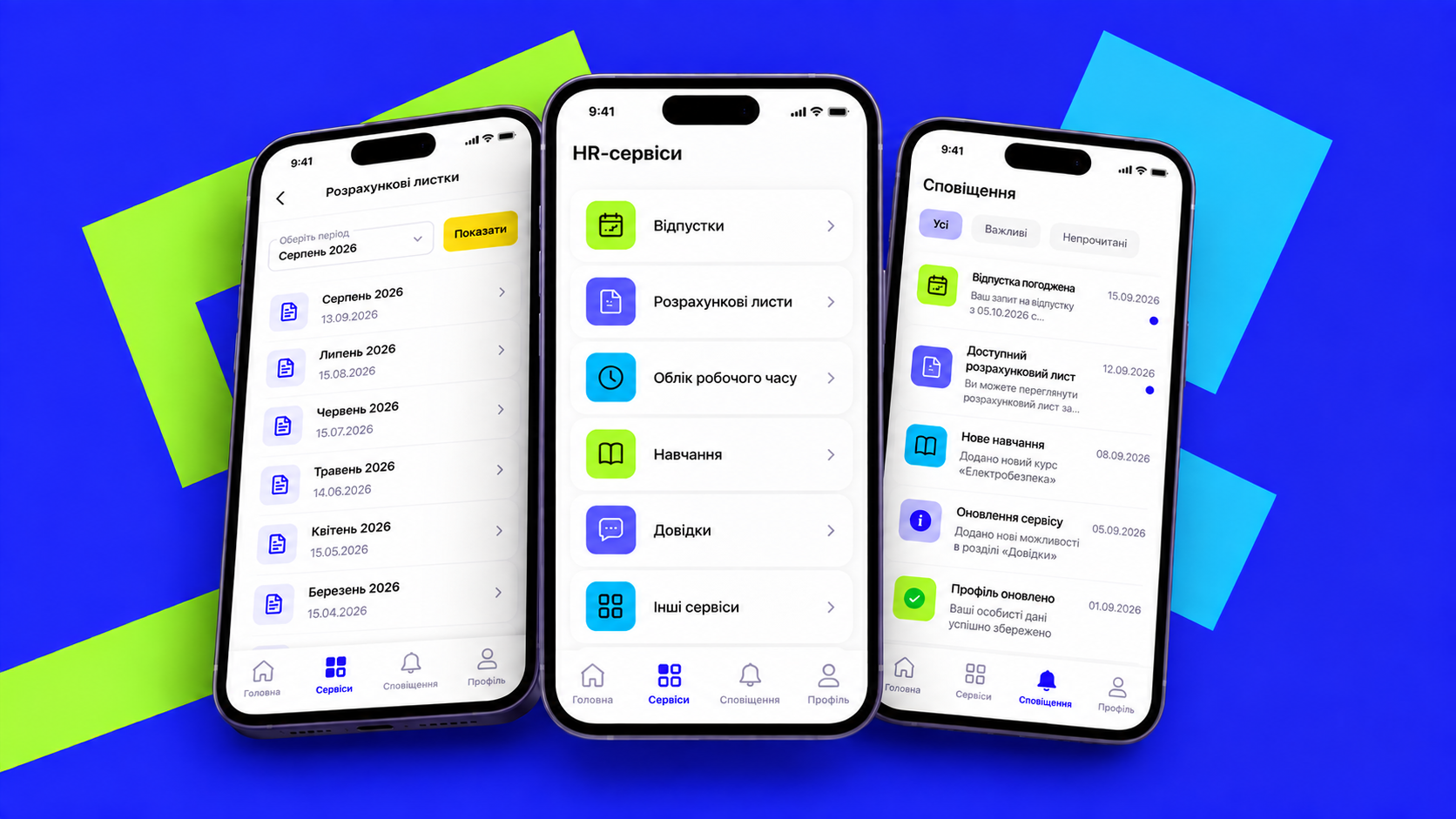
People do not open the app to use an HR platform. They open it to resolve a specific issue. That is why the initial set of services is built around everyday needs: submitting a leave request and checking its status, viewing a payslip, requesting a certificate, signing a document and receiving a notification when action is required.
Employees do not have to build the approval workflow themselves. The system determines it based on the company’s organisational structure. We explain how this works in more detail using leave requests as an example in the article “You Have Already Moved Leave Requests Online. Why Hasn’t the Process Become Any Faster?”
Notifications matter more than they might seem. People open the app when they have a reason to: a status has changed, a new document is available or an action is required. Without notifications, the app becomes just another icon that no one opens.
Some employees do not have a smartphone, and this scenario needs to be addressed before launch, not after.
One practical option is to provide a shared smartphone within the business unit. Each employee signs in using their own phone number and a one-time code, completes the required action and signs out.
However, a shared device requires clearly documented rules: mandatory sign-out after each session, a limited session duration, a designated person responsible for the device, and a defined procedure if the phone is lost or replaced. Otherwise, the next user may gain access to someone else’s data, turning a solved access problem into a personal data incident.
It is best not to start with dozens of features. In our experience, the first two services are usually payslips and leave requests. The company then selects the third based on its own HR request statistics.
On launch day, receiving the correct link and successfully completing the first sign-in matter more to an employee than reading a presentation about the platform. A short video and a one-page guide are enough.
We built DEEP for an agricultural company where more than 60% of the workforce consists of tractor drivers, milking machine operators and grain dryer operators. During sowing and harvesting seasons, these employees had to travel to regional offices to complete HR paperwork.
The most challenging part turned out to be not the interface, but access. Once employees needed only the phone number stored in the HR system and a code sent by SMS to sign in, more than 1,000 employees started using the app within the first six weeks. These are our own figures, and they point to one conclusion: employees needed access, and their willingness to use digital services was not the barrier.
At DTEK, DEEP covers 100% of the workforce, including production and field teams, and has around 25,000 active users every month.
What does the law require regarding payslips?
Article 110 of the Labour Code of Ukraine requires employers to inform employees, each time their salary is paid, of the total amount with a breakdown, the amounts and grounds for deductions, and the net amount payable. The law does not prescribe a specific form of notification. The company should establish the procedure for providing payslips electronically in an internal policy agreed with its legal team.
Can messengers be used?
In its ruling of 9 January 2026 in case No. 751/4083/24, the Supreme Court recognised a Viber message as valid proof of acknowledgement where the recipient, content and date could be established. However, the burden of proving this rests with the employer, and a chat provides neither an action log nor a document status.
Does an employee need a corporate email address?
No. Employees sign in using the phone number stored in the HR system and a one-time code.
How secure is it?
A one-time code is sufficient for access to the employee profile. Document signing and access to financial data require a second factor, such as an additional code or Face ID.
What about employees without smartphones?
A shared device can be provided within the business unit, with mandatory sign-out and approved rules for its use.
During the demonstration, we will show the complete journey of an employee without corporate email: first sign-in, profile access, request submission and document receipt, using your roles and organisational structure.